Wedding Planner by Valere

Wedding planner app for South African couples

Budget, vendor quotes, tasks for your wedding party, guest list and honeymoon, together in one private app for you and your partner. R199 once, no subscription.

See what is included
  • One-time payment
  • Partner and helpers included
  • View your plan offline
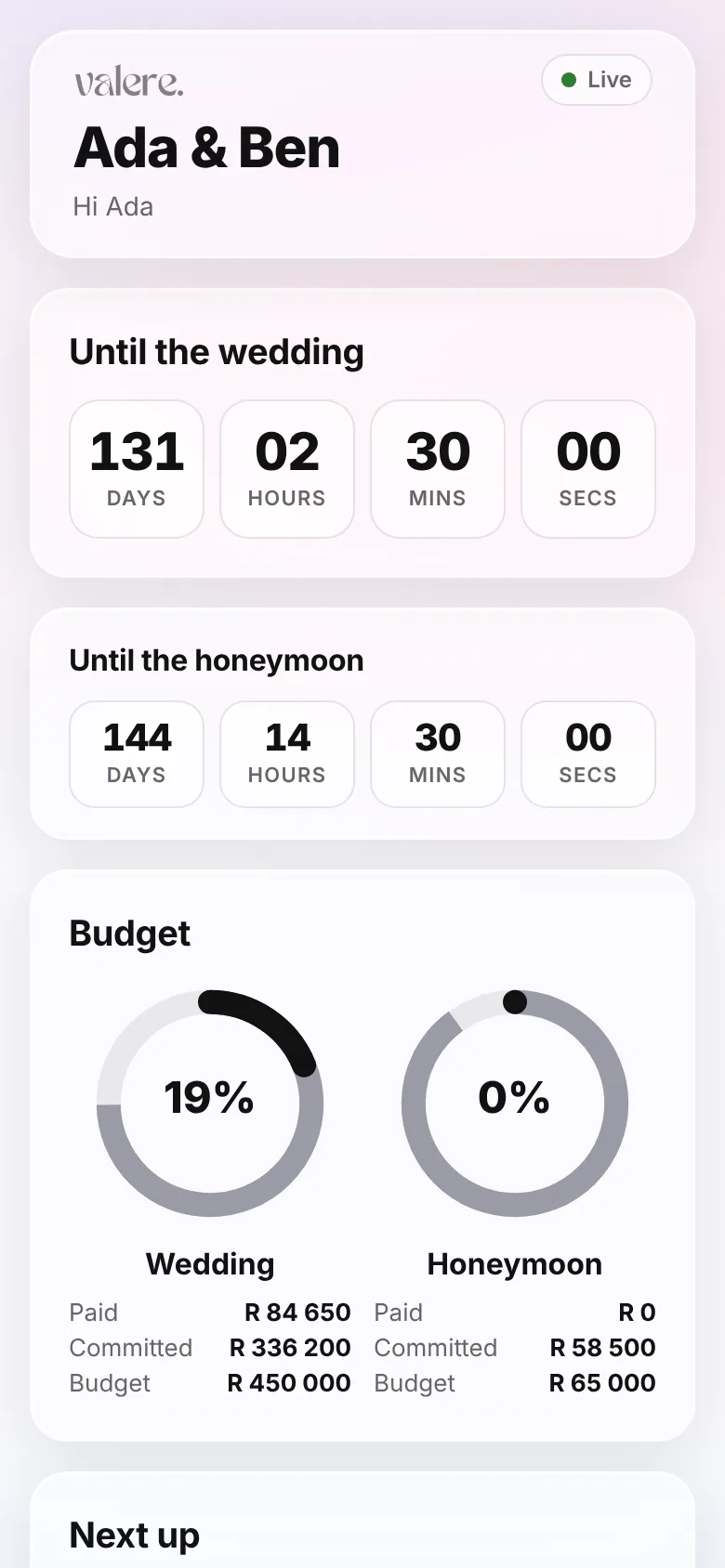
Wedding Planner home screen with a countdown to the wedding day, budget rings and next-up list

How it works

  1. 1

    Buy the Wedding Planner

    Sign in or create an account and pay once. There is no subscription.

  2. 2

    Set up your wedding

    Add your date, budget and the things you already know. Bring a guest list in from a CSV.

  3. 3

    Invite your partner and helpers

    Your partner gets full access. Helpers see only the tasks you assign to them.

Everything you need to plan the wedding

Real screens from the app, shown with a made-up couple. Every feature below is included in the one price.

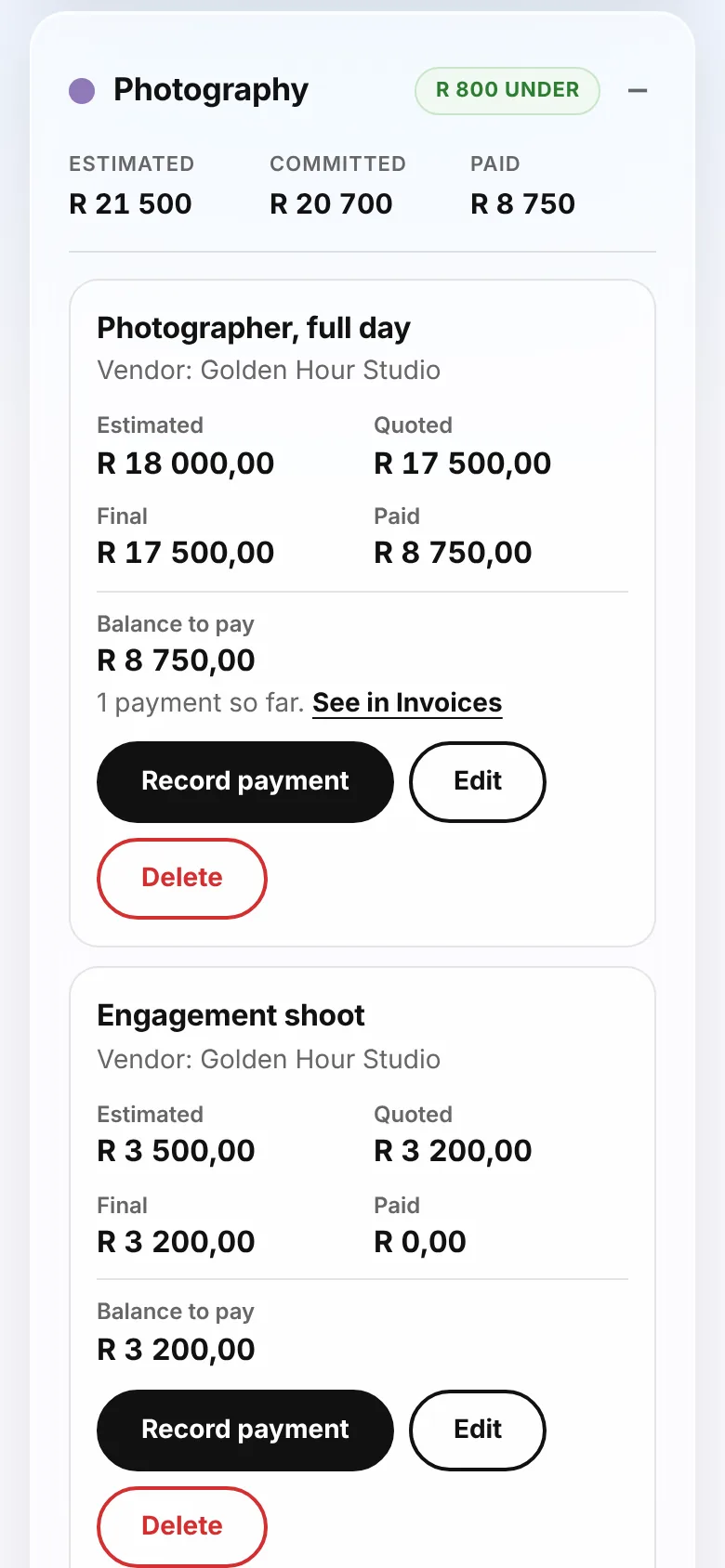
A wedding budget tracker that follows the money

Set an overall budget, split it into categories and budget lines, then record what each supplier quoted, what they invoiced and what has actually been paid. Every amount is in rand, and the totals update as you go.

  • Quotes, invoices and payments kept apart, so you always know the balance still to pay
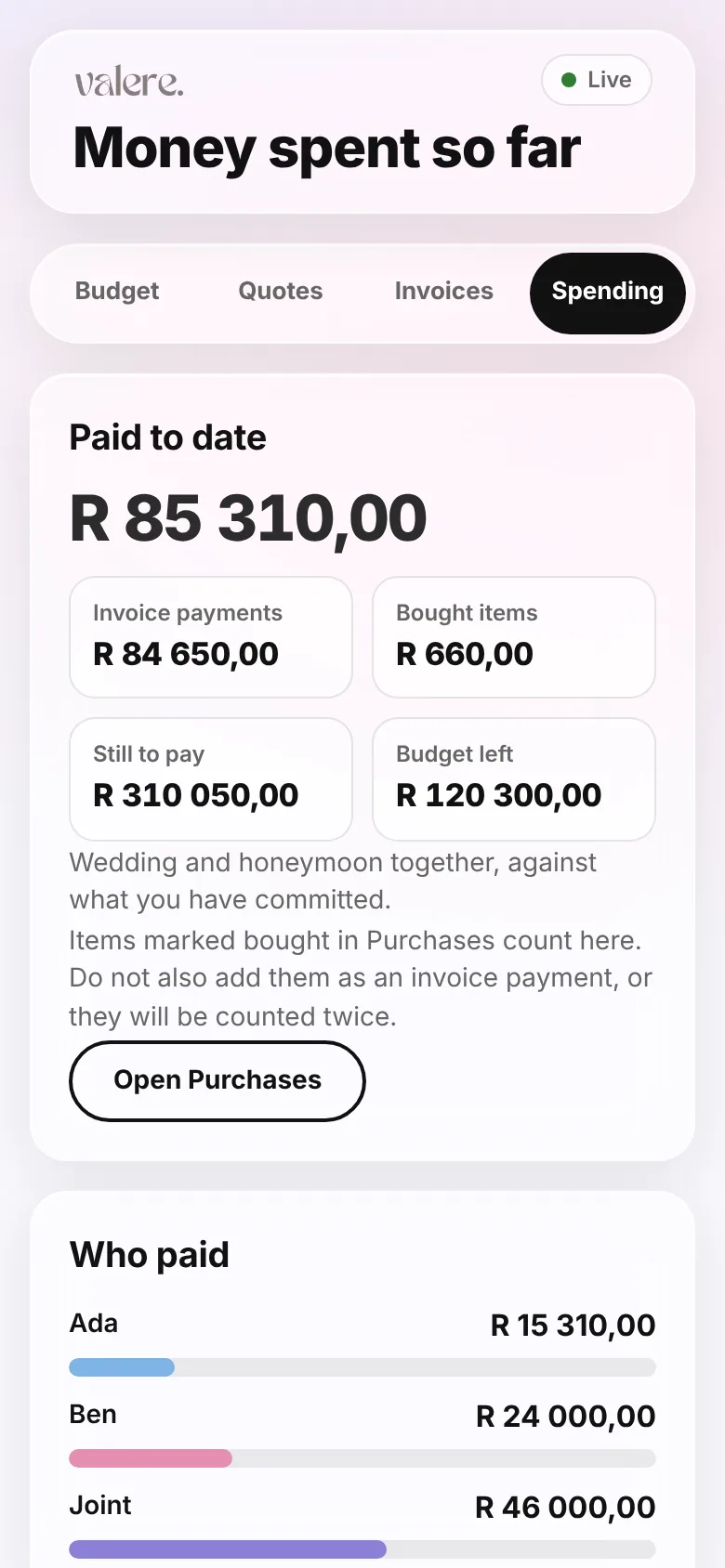
  • See who paid: you, your partner or both of you jointly
  • Attach proof of payment and the invoice itself
  • A savings tracker and a money-spent summary by category and month
Wedding budget tracker with the photography category open, showing estimated, quoted, final and paid amounts in rand
Money spent so far screen showing paid to date and how much each partner has paid

Compare vendor quotes side by side

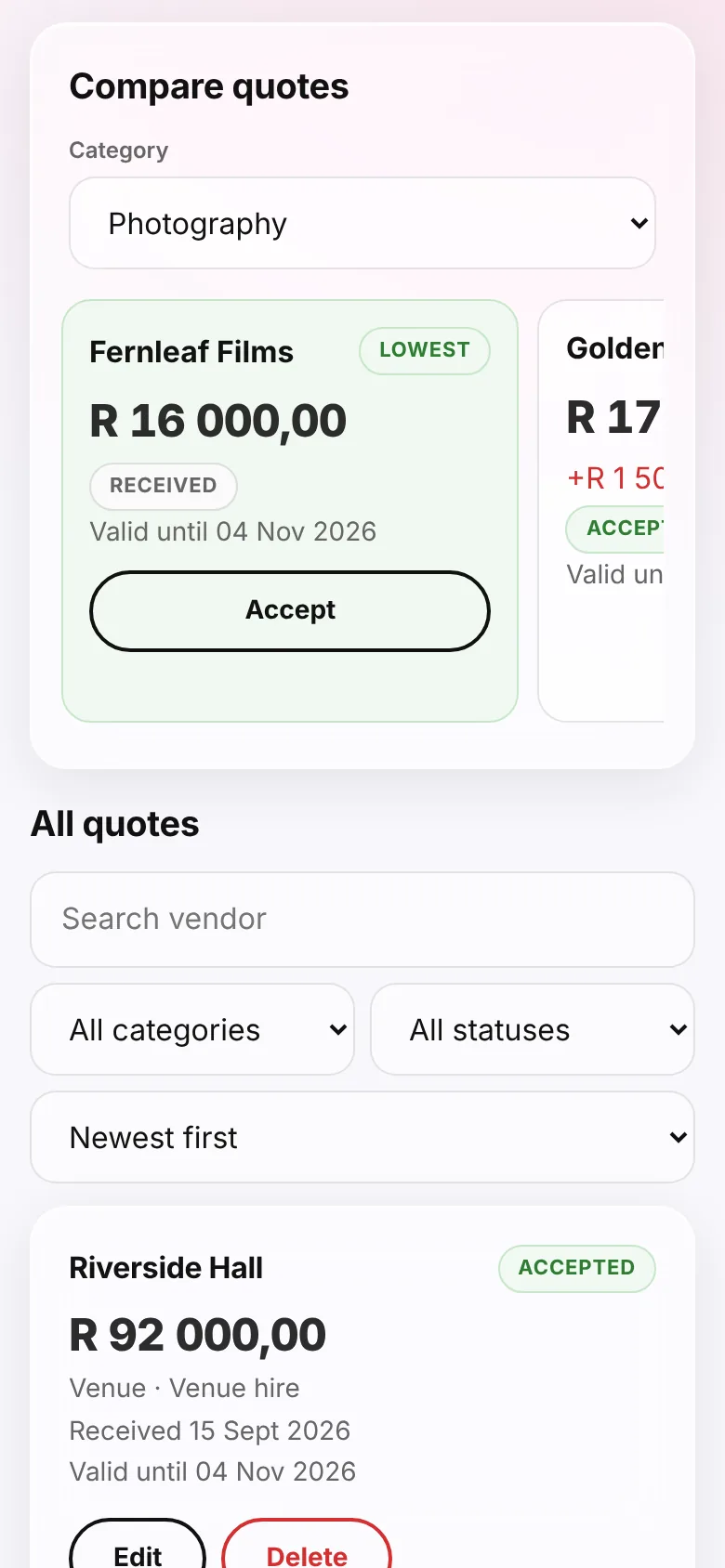
Collect quotes from several photographers, florists or caterers and see them next to each other with the lowest highlighted. When you decide, accept one and it becomes a budget line, with the supplier details kept alongside.

  • Mark quotes as requested, received, shortlisted, accepted or declined
  • See how far each quote is above the cheapest
  • Note what each quote includes and how long it is valid
  • Keep supplier contact details in one place
Vendor quote comparison with the lowest quote highlighted and an Accept button

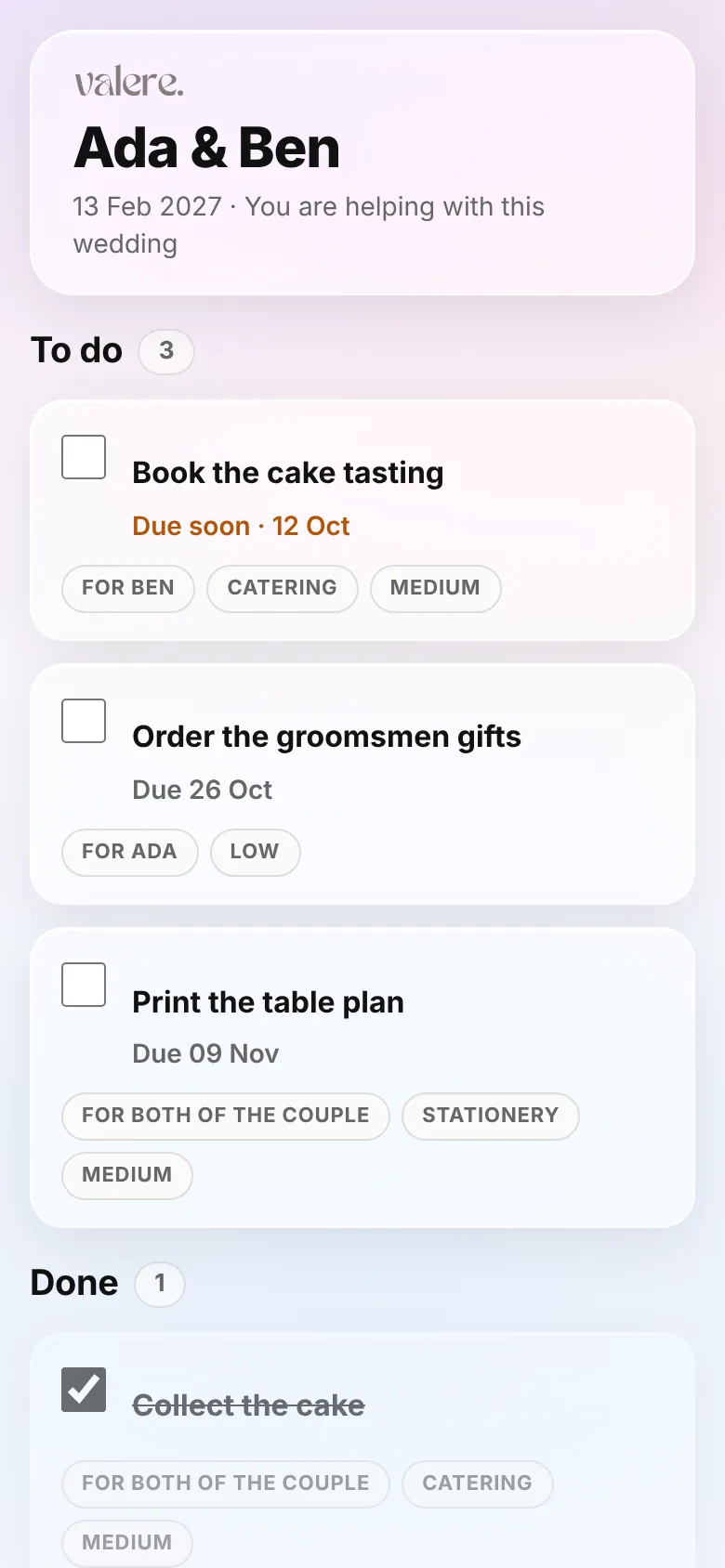
Wedding to-do list you can hand to your wedding party

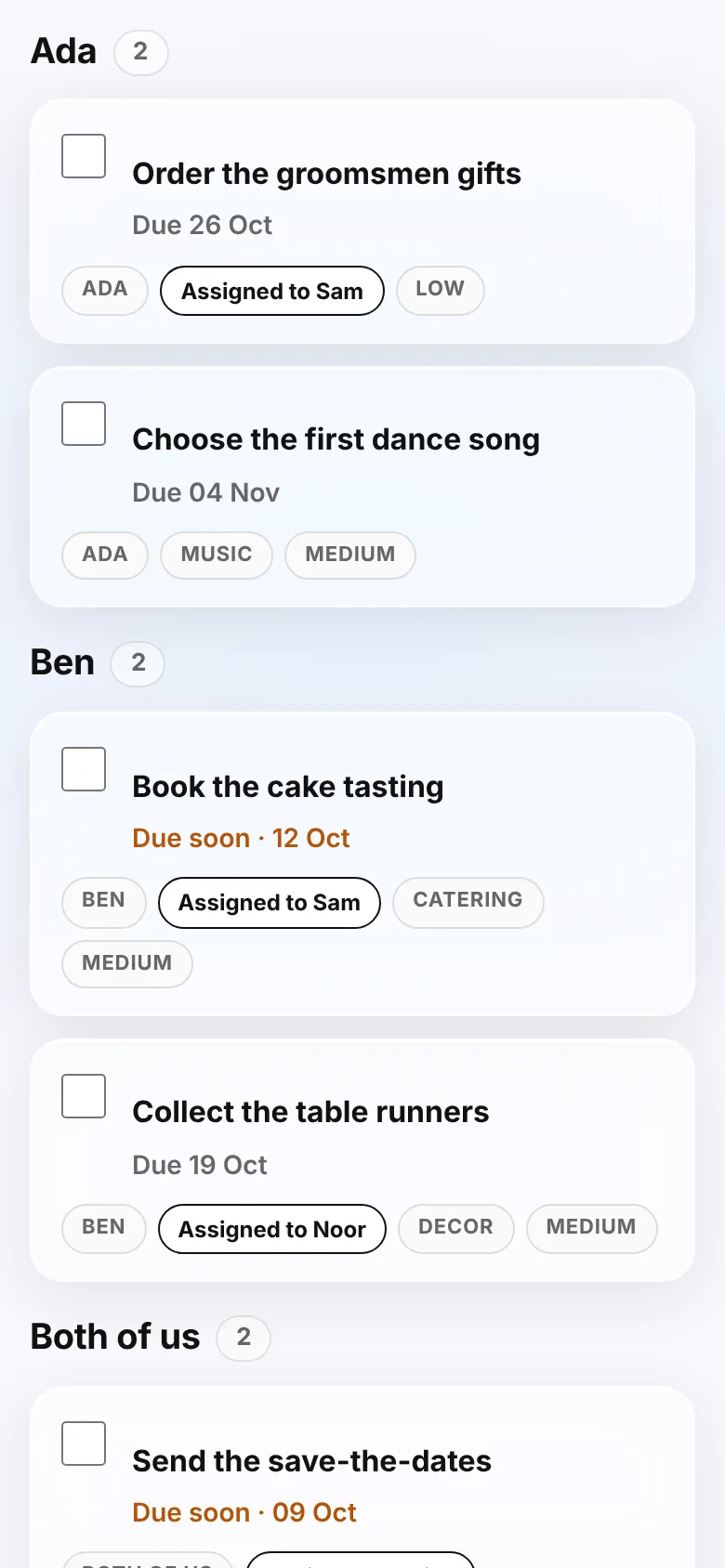
Break the work into tasks and subtasks with due dates and priorities, and repeat the ones that recur. Hand a task to a bridesmaid, groomsman or family member and they get a login that shows only the tasks given to them.

  • Tasks grouped by person, with a chip showing who it is assigned to
  • Helpers can tick tasks off or change their status
  • Filter by person, category, priority or status
  • Up to 10 helpers, and nobody you invite pays
Wedding task list grouped by person, with chips showing which helper each task is assigned to
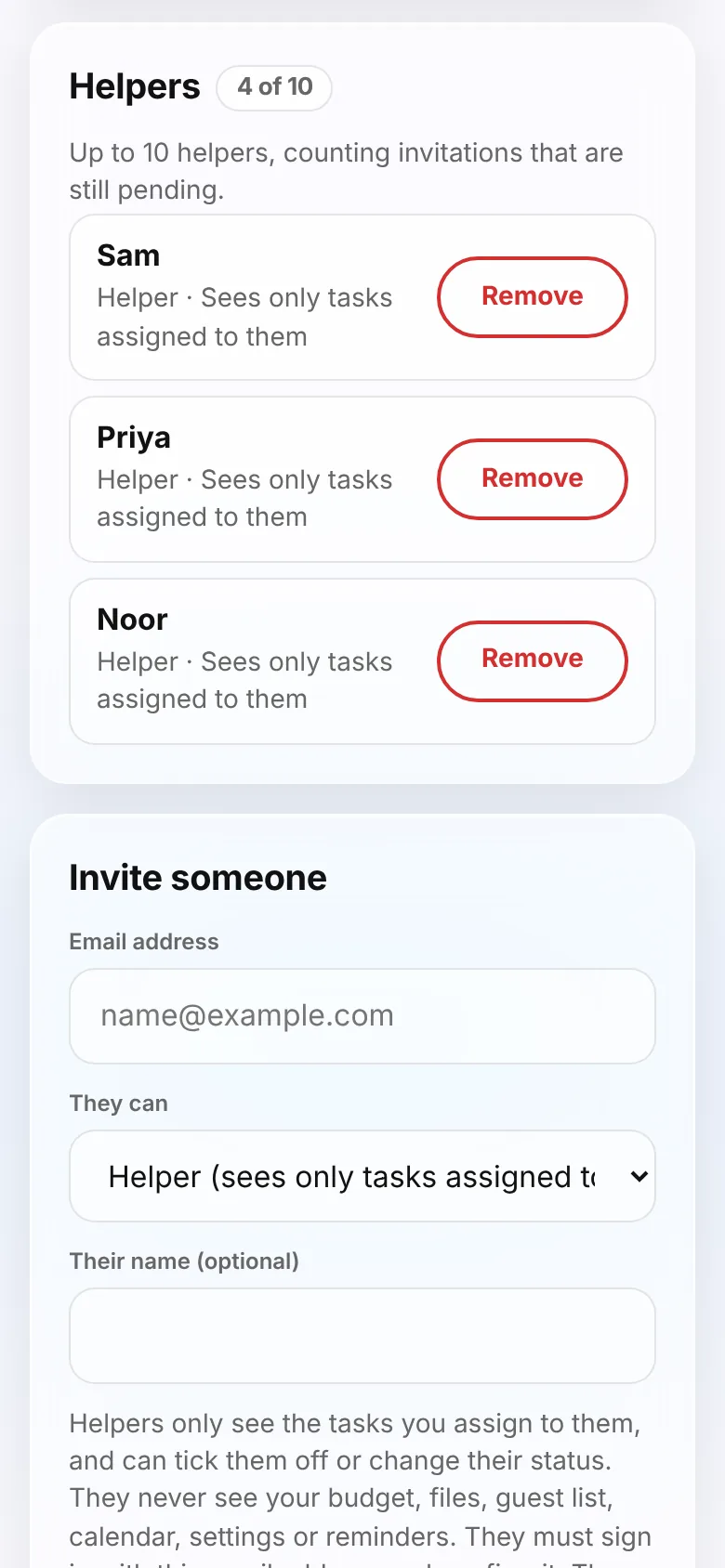
Team screen listing three helpers and an Invite someone form

Wedding calendar with email reminders

Appointments, fittings, tastings, task deadlines and payment due dates all land on one calendar. Choose to get a short daily email before things are due, and send the whole calendar to your phone with an .ics export.

  • Month, week and agenda views, with colours for events, tasks and payments
  • Reminders are optional and set per person
  • Pick how early to be reminded, from the same day up to 30 days before
  • Reminder emails list titles, times and payment amounts, never guest details
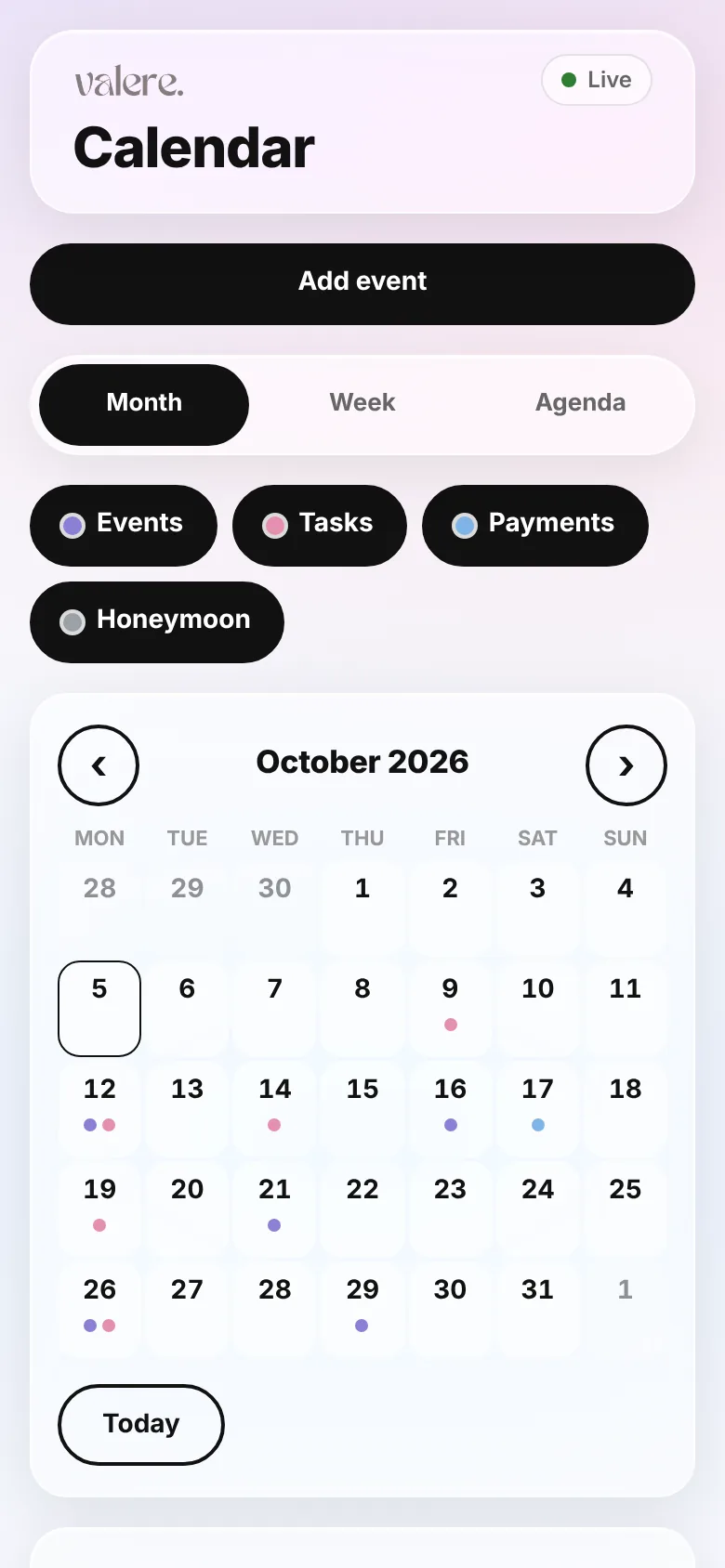
Wedding calendar for a month with coloured dots for events, tasks and payments
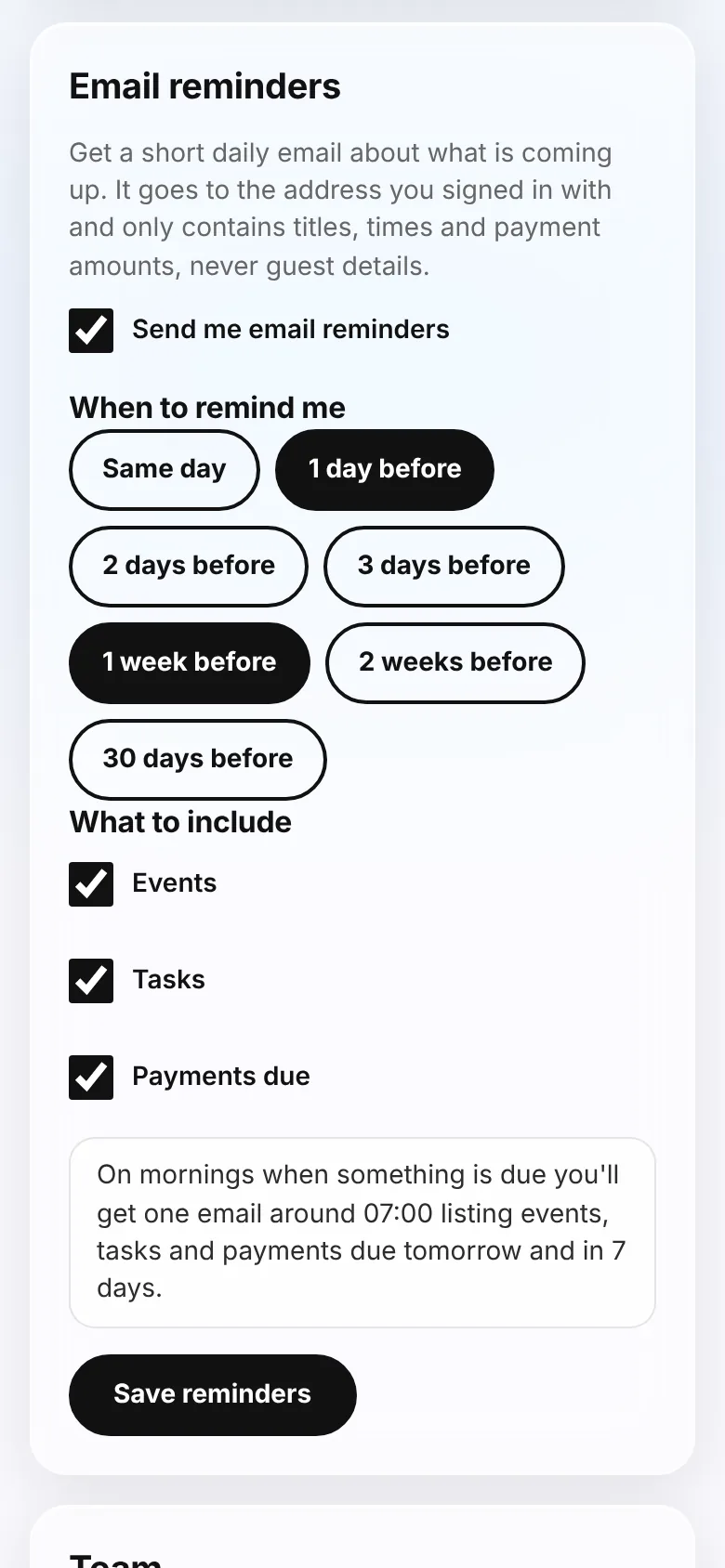
Email reminder settings with choices for when to be reminded and what to include

Guest list and RSVP tracking with CSV import

Keep every guest, their party size, dietary notes and table in one list. Bring an existing list in from a CSV, then record each answer as it comes in. The summary shows who is coming, who has not replied and how many meals to plan for.

  • Import a guest list from a CSV file
  • RSVP summary by invited, coming, maybe, waiting and not coming
  • Filter by side or by RSVP status
  • You update the RSVPs yourself: the planner does not send invitations to your guests
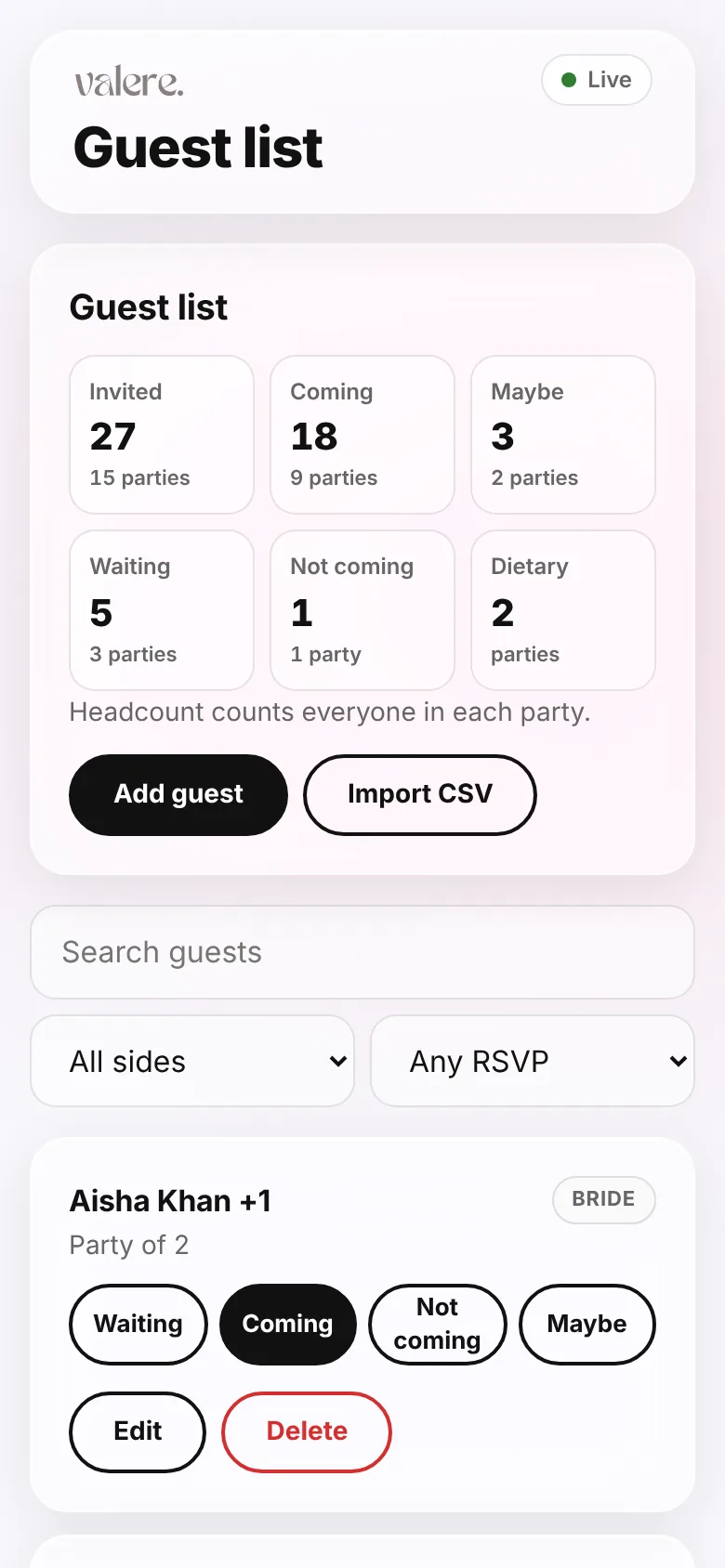
Guest list with an RSVP summary and buttons to mark each guest as coming, maybe or not coming

Honeymoon planner with itinerary and rand-to-baht converter

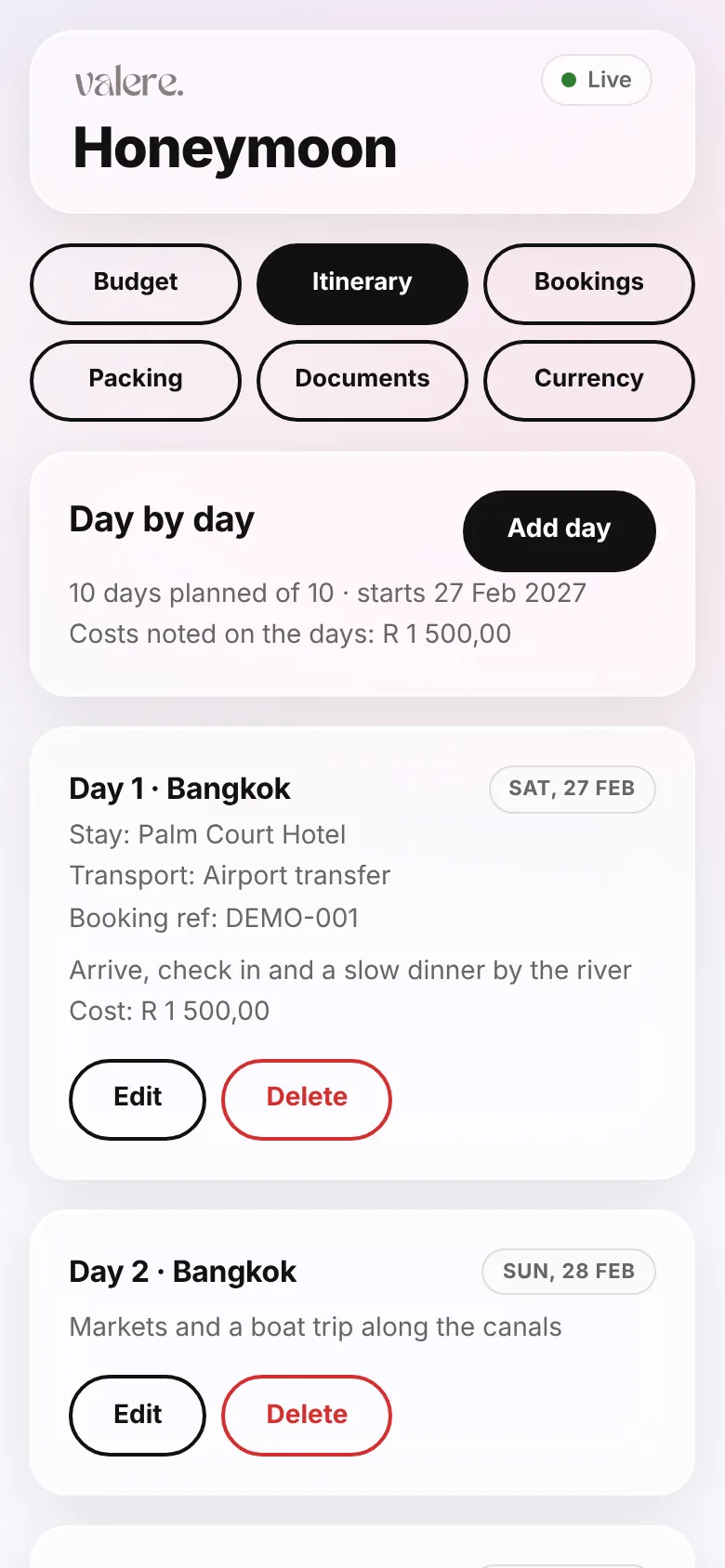
Plan the trip next to the wedding. Build a day-by-day itinerary, keep flight and accommodation bookings with their confirmation numbers, track a separate honeymoon budget and check what a price is in rand.

  • Itinerary with city, stay, transport and booking reference for every day
  • Bookings, a packing list and a travel documents checklist
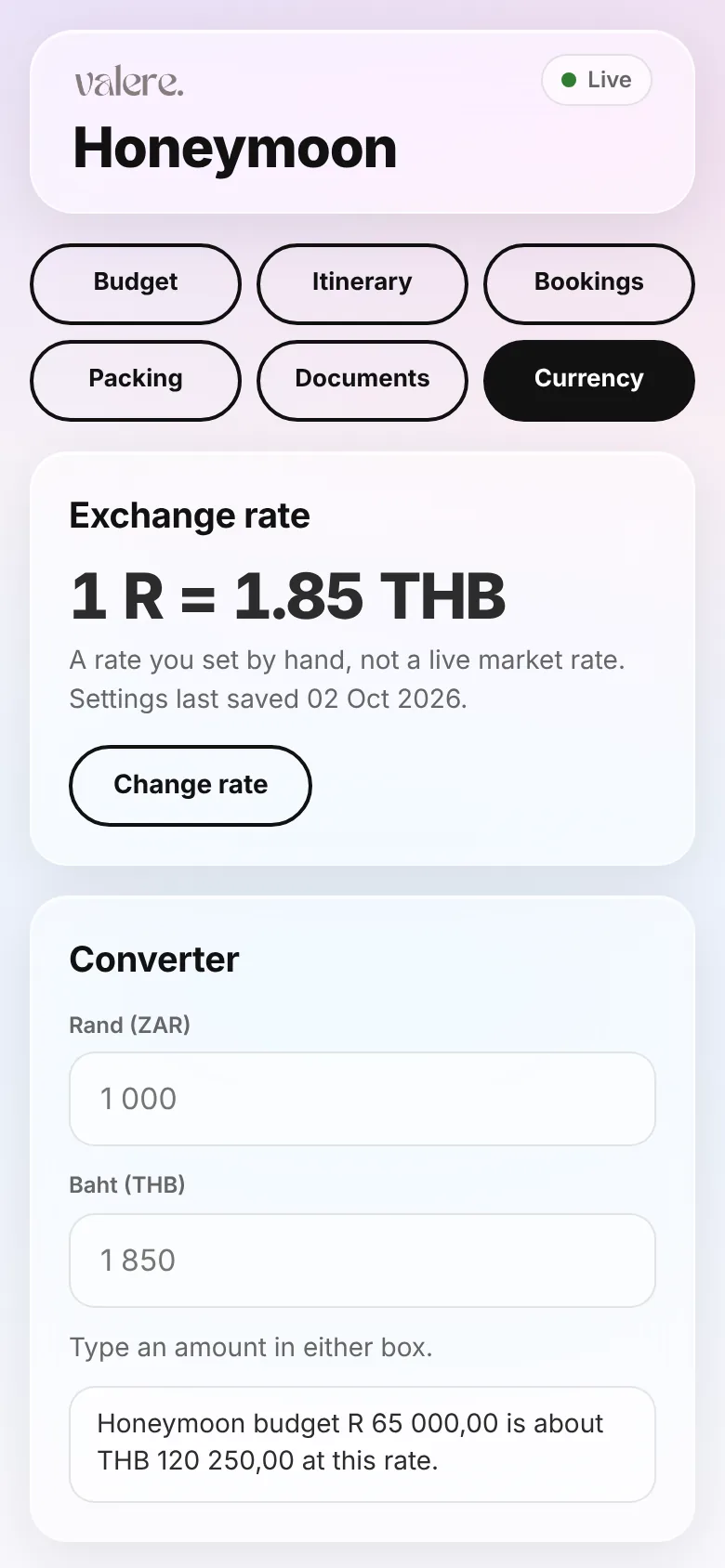
  • Converter between rand (ZAR) and Thai baht (THB) using a rate you set
  • A honeymoon budget kept apart from the wedding budget
Honeymoon planner day-by-day itinerary with accommodation and transport for each day
Honeymoon currency converter between South African rand and Thai baht

Purchase checklist with receipts

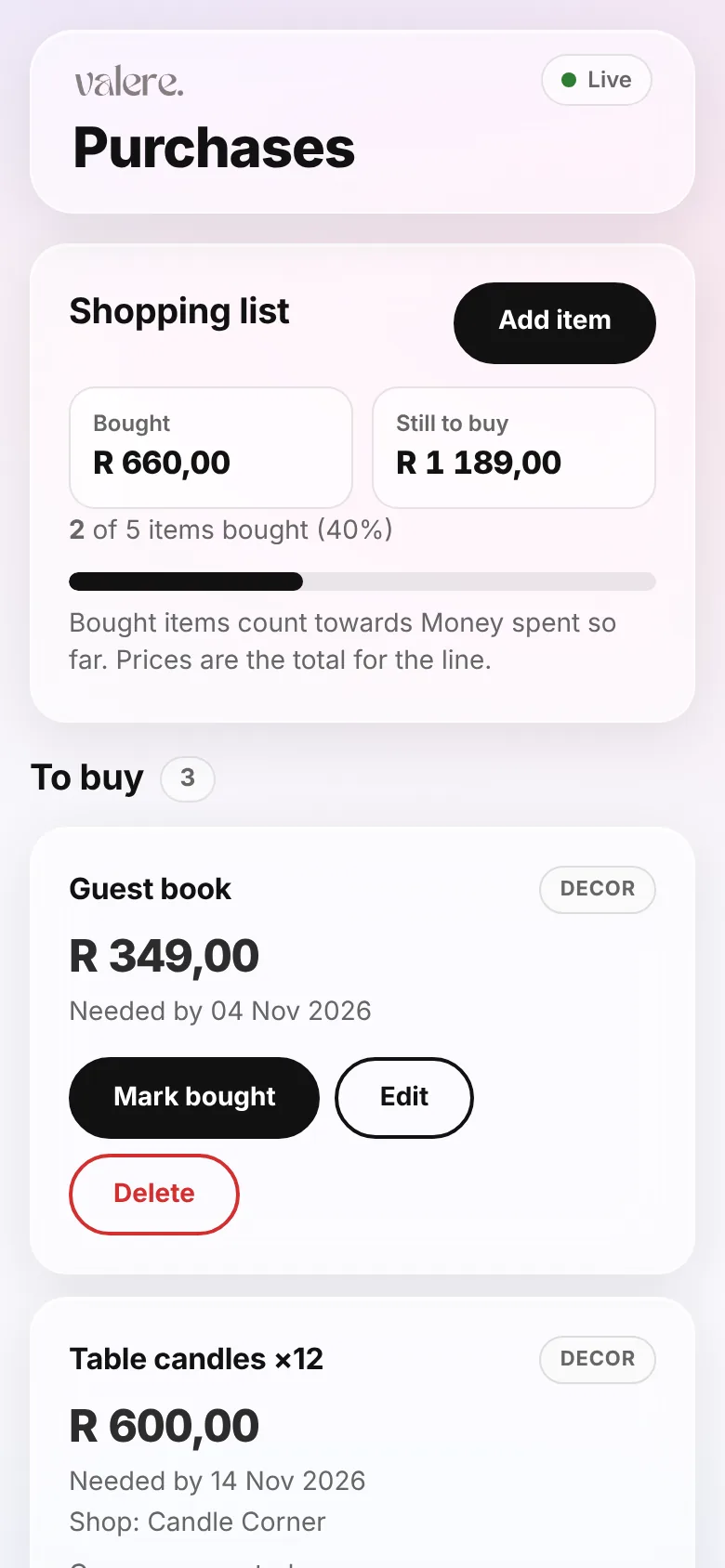
Decor, attire, stationery and all the small things add up. List what you still need to buy, mark items as bought with the shop and who paid, and attach the receipt. What you have bought counts towards the money you have spent.

  • To buy and Bought lists with running totals
  • Quantity, price, needed-by date and shop for each item
  • Receipt upload for every purchase
  • Bought items feed into the money-spent summary
Wedding shopping list with items still to buy, totals and a Mark bought button

View your plan offline: install it on your phone and save it for offline

Add the planner to your phone’s home screen, then tap Save for offline while you have signal. After that you can view your plan without a connection, at the venue or in a shop. Changes, and receipt files, need a connection; when you are back online, changes sync live between you and your partner.

  • iPhone: install from Safari with Share, then Add to Home Screen
  • Android: tap the Install button, or use the browser menu
  • Tap Save for offline to keep your plan on your phone
  • Viewing only: changes and receipts need a connection
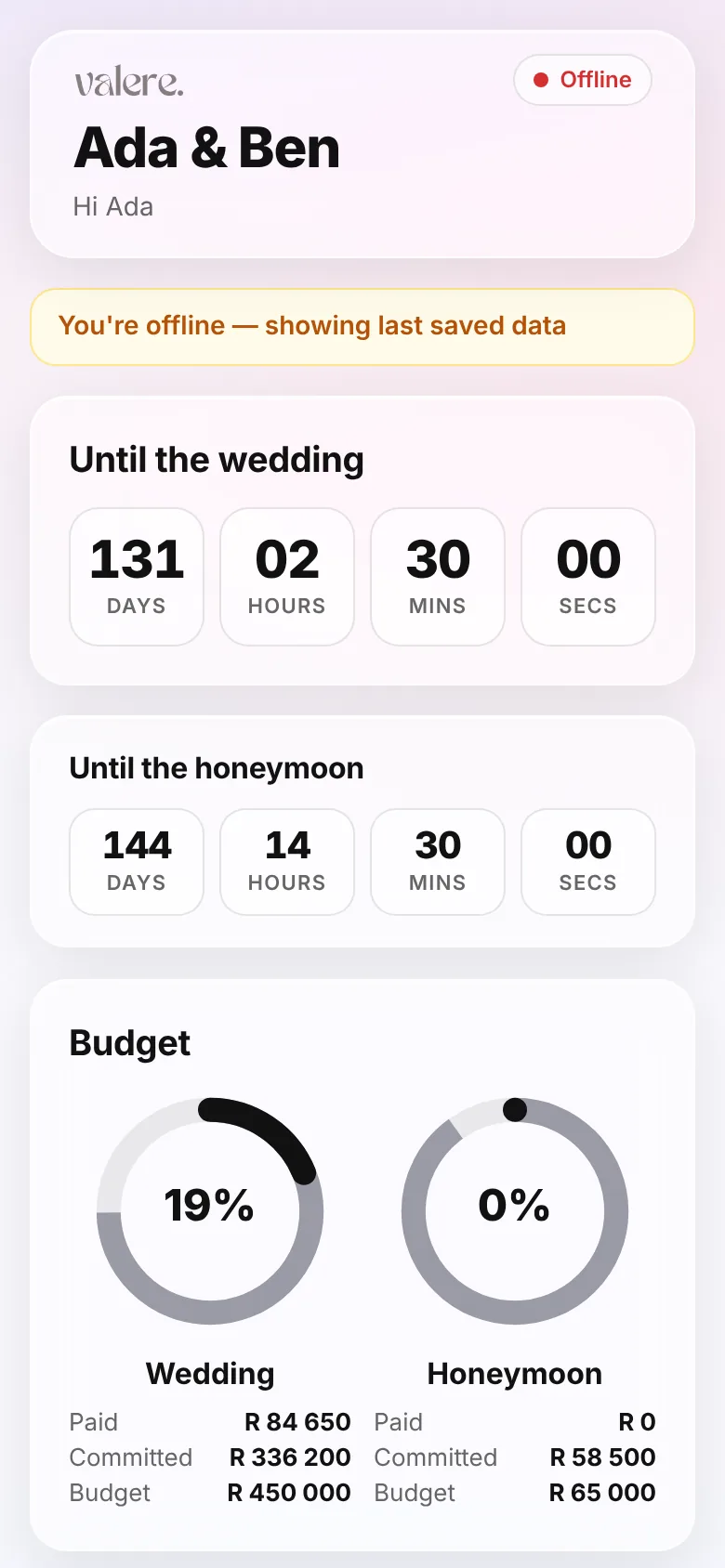
  • An obvious banner tells you when you are offline
Wedding Planner showing an offline banner and the last saved plan

Who the Wedding Planner is for

Couples planning it themselves

No planner, a long list of suppliers and a budget that needs watching. Everything lives in one place that you both can open.

Couples with a helping wedding party

Bridesmaids, groomsmen and parents who want to help. Give each of them their own tasks without sharing your finances.

Couples splitting the costs

Record who paid for what, so there are no awkward conversations about who has covered more.

Couples honeymooning abroad

Keep flights, stays, documents and a rand budget next to the wedding plan instead of in another app.

What it is not

  • It is not a supplier directory or marketplace, so you add your own suppliers and quotes.
  • It does not send invitations to your guests. It tracks the RSVPs you receive.
  • It does not book or pay suppliers for you.

Wedding Planner vs spreadsheets

Wedding Planner compared with a spreadsheet
FeatureSpreadsheetWedding Planner
CostFreeR199 once per wedding
LayoutAnything you can buildReady made, less to design
Budget totalsFormulas you write and fixQuoted, invoiced and paid worked out for you
DelegatingShare the whole file or none of itHelpers see only their own tasks
RemindersSet up yourselfOptional daily email
Receipts and proofKept elsewhereAttached to the payment or purchase
On your phoneWorks, but fiddly to editBuilt for phones, installs to the home screen

A spreadsheet is a good choice if you enjoy building your own system. The planner is for couples who would rather start with one.

Wedding planning checklist: 12 months to the big day

A general timeline for South African weddings. Squeeze it or stretch it to fit your own date, then put the tasks into your planner and hand some to your wedding party.

  1. 12 months or more to go

    • Agree a total budget and who is contributing what
    • Set a date range and a rough guest count
    • Visit and shortlist venues, then get written quotes
    • Book your venue and a marriage officer, and ask what documents you will need
  2. 9 to 12 months

    • Request quotes from photographers, caterers and a DJ or band
    • Pick your wedding party and tell them early
    • Start looking for attire and book fittings
    • Plan the honeymoon and check passport validity for where you are going
  3. 6 to 9 months

    • Confirm the main suppliers and pay their deposits
    • Send save-the-dates, especially for guests who must travel
    • Book accommodation for out-of-town guests
    • Book flights and accommodation for the honeymoon
  4. 3 to 6 months

    • Choose flowers, decor and stationery
    • Arrange a cake tasting and the menu
    • Send invitations and start tracking RSVPs
    • Hand out tasks to your helpers
  5. 1 to 3 months

    • Chase outstanding RSVPs and collect dietary needs
    • Do final dress and suit fittings
    • Confirm timings with every supplier
    • Start the seating plan and buy the remaining small items
  6. The last month

    • Give the venue your final guest count
    • Pay final supplier balances and keep the receipts
    • Print the seating plan, signs and the order of the day
    • Pack for the honeymoon and collect your travel documents
  7. Wedding week

    • Walk through the venue with your coordinator or helpers
    • Confirm who is collecting the cake, flowers and decor
    • Prepare tips and any final payments in envelopes
    • Rest, eat well and let your helpers handle their tasks

Private and secure: who sees what

Your helpers should be able to help without seeing your finances. Only the people you invite can open your plan, and the database enforces it, not just the app.

A helper’s view of the planner showing only their own tasks, with no budget or guest list

Helpers can see

  • Only the tasks assigned to them
  • Nothing else from your plan

Private to you and your partner

  • Budget, quotes and payments
  • Uploaded files and documents
  • Guest details and RSVPs

One price. Everyone included.

Wedding Planner

R199 one-time, per wedding

  • Your partner, with full access
  • Up to 10 helpers on assigned tasks
  • Budget, tasks, calendar, guests, honeymoon
  • Offline viewing once saved, and phone install
  • No subscription

Included free with The Whole Reel for Valere photo events. See event pricing

Secure payment by Paystack. See our refund policy.

Wedding Planner questions answered

Is it a one-time payment?

Yes. It is R199 once per wedding. There is no subscription and no renewal.

What is included in the Wedding Planner?

The budget tracker with quotes, invoices and payments, vendor quote comparison, tasks you can assign, a calendar with optional email reminders, a guest list with RSVPs and CSV import, a honeymoon planner, a purchase checklist with receipts, data export, and viewing your saved plan offline on your phone.

Who can I invite, and do they have to pay?

Your partner joins with full access, and you can invite up to 10 helpers such as your wedding party or family who are pitching in. Nobody you invite has to pay: it is all included in the one price.

Can my helpers see our money?

No. Helpers see only the tasks assigned to them. Your budget, quotes, payments, files, guest list and calendar stay private to you and your partner.

Can I view it offline, and does it work on iPhone and Android?

You can view your plan offline: install it on your phone, then tap Save for offline while you are connected. Changes and receipt files need a connection, and everything syncs again when you are back online. There is no app store. On iPhone, install through Safari: tap Share, then Add to Home Screen. Android shows an Install button, or use the browser menu and choose Install app or Add to Home screen. If you opened the link inside Instagram or Facebook, open it in your browser first.

Is my data private?

Yes. Only the people you invite can open your plan, and access is enforced in the database, not just in the app. Uploaded files open only through short-lived links.

How do invitations work?

Enter the person’s email address and choose whether they are your partner or a helper. They get an email with a personal link, sign in or create an account, and join your wedding. You can resend or revoke an invitation at any time.

Can I export my data?

Yes. You can download your budget lines, payments, guest list, purchases and tasks as CSV files, export everything as one JSON file, and send your calendar to your phone as an .ics file.

Which currency does it use?

Everything is in South African rand (ZAR), with dates shown in South African time. The honeymoon page also has a converter between rand and Thai baht that uses a rate you set yourself, not a live market rate.

Is it only for South Africa?

It is built with South African couples in mind, with rand amounts, local payment methods such as EFT and PayShap, and South African time. Nothing stops you using it elsewhere, but amounts are always shown in rand.

Is it part of the photo gallery product?

It is a separate add-on from Valere. You can buy it without creating a photo event, and the photo gallery works without it.

What if I need a refund?

Our Refund Policy explains how refunds and cancellations work. It is written mainly around photo events, so if you have a question about a Wedding Planner payment, email us before you pay.

Read the Refund Policy
Start planning together

R199 once for the whole wedding, with your partner and up to 10 helpers included.

Also planning the photos? See how Valere photo sharing works, where guests upload photos straight from their phones.